A little Odysseus: How I solve my latency problem in NeoVIM
A bit of context
I used to say that I should write more blog posts. It was about a year ago. You hold in your hands the first blog post of 2025. Nice, yeah! 🎉
Now we have done the presentation, let's dig into the problem. Now that we've done the introduction, let's delve into the problem. For a while, when I was editing some large files on NeoVIM, it would lag and insert the same character multiple time. It was quite painful, but it didn't occur frequently enough to become "a Problem" (with a capital P). I would simply remove the extra text and carry on until it happened again. It was not out of laziness but because I read that it could become a problem with the language server when dealing with large files.
At some point, it started printing things like:
Wriiiiiiii|
Rewriting the config
A few weeks ago, I started doing what any NeoVIM developer would do when they
have some free time: I rewrote my configuration. Apart the fact I'm happy with
the more readable version (you can have a
look),
I realized it was time to get my hands dirty and dig into this lagging issue.
After some investigations, I came to understand the problem mostly occurred editing large markdown files. The lag was also showing up on large files when they were comments in it.
At some point, I saw this small popup at the bottom of my NeoVIM window:
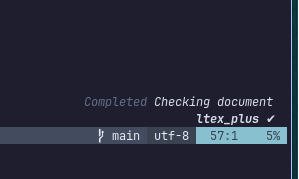
It is a notification informing me the ltex-ls had completed its job. It was doing this on every keystroke.
My first test was to disable it, and... It worked! 🥳 However, while disabling it was a solution, the conscientious reader can easily understand this is not a pleasant solution: I want my editor to yell at me when doing grammar mistakes.
DuckDuckGo is my friend
I opened Firefox and started looking for a solution. The first interesting
point I found was ltex-ls had
not been maintained for two years! 🤦🏻♂️ Some people have forked the project and named
it ltex-ls-plus. The first step
was to replace it in my configuration:
local servers = {
    -- I have removed
    -- ltex = {
    -- [...]
    -- },
    -- and replaced it with;
    ltex_plus = {
        -- [...] We will see this part later.
    }
}
The "nice part" of being a late adopter is that the people at nvim-lspconfig already added a configuration for it.
However, I want the server to be "slower" and only perform checks when I want
it to, specially when I save (:w) files. That's when I discovered two
interesting configuration: debounce_text_changes and checkFrequency. The
first one is a flag that asks NeoVIM to send the data only every X time
unit. The second allows the server to choose when to run. I changed the
settings to make it run only on save:
local servers = {
    ltex_plus = {
        settings = {
            ltex = {
                checkFrequency = "save", -- TADA!
                -- [...]
            }
        },
        flags = { debounce_text_changes = 300 }, -- TADA number 2! Here the time is in ms
    }
}
Thanks to this, I can now write in large files and check for grammar only when I save. It reduces the load because it checks the file only once. Plus, as the sending is delayed, it asks the server less frequently, also reducing the load on the LSP[1].
Toward an improvement?
As I had to delve into the ltext-plus-ls documentation, I discovered I could use the Front Matter[2] to specify the language. Since my wiki mixes English and French, this is convenient.
Now I can specify the language with:
---
lang: en-GB
---

Blabla bla bla blabla [...]
Thanks to a sed script, I have updated my website code to parse the new
format. Honestly, this is now a very neat experience!
Conclusion
Sometimes, it is good to clean up the configuration as long as it doesn't take more time than the time you will use software. It also shows how easy it is to forget the dependencies of the tools we work with (contrary to the conscious checks we do on the projects we work on).
Looking at my watch, it is herbal tea time for me 🫖 I leave you with this. Hope you enjoyed the article and that it might have helped you with your own lagging issues.